Generating screen forms automatically from configuration files
Generating screen forms, including their REST integration, automatically from configuration files – a success story from an Angular project.
Imagine a client with big plans for a graphical user interface (GUI). The GUI is meant to help customer service agents and administrators manage a large number of records. Sounds like a huge task, doesn’t it? The client had one problem, though: they had no frontend developers and wanted to save time and money.
The scenario (greatly simplified)
Our users are customer service agents who need to edit data on customers, orders and deliveries. Each of these areas has its own screen form. Sounds like a lot of work, doesn’t it? Should every screen form be implemented by hand? And the connection to the backend? No! We use configuration files, and almost everything works automatically.
The answer: configuration files
The idea is simple but powerful: generate screen forms from configuration files. These files contain attributes such as the name, permissions, endpoints and search filter criteria. And voilà! The screen is built automatically from this information. A bit like magic, isn’t it?
Why is this a success?
- Saving time and money: Imagine every screen form had to be implemented individually. A nightmare, right? Not for our client! Thanks to automatic generation, they saved time and money.
- Extensibility: Non-developers can now add new screen forms. Just add the configuration files and off you go!
- Automation: Everything is generated automatically, including the connection to the REST backend. The maintenance and testing effort? Drastically reduced!
- Bonus features: Our client benefited from i18n (AOT), and the generator was extracted into a library of its own.
Code on GitHub: christoph-sens/flexible-ui-cool
Example
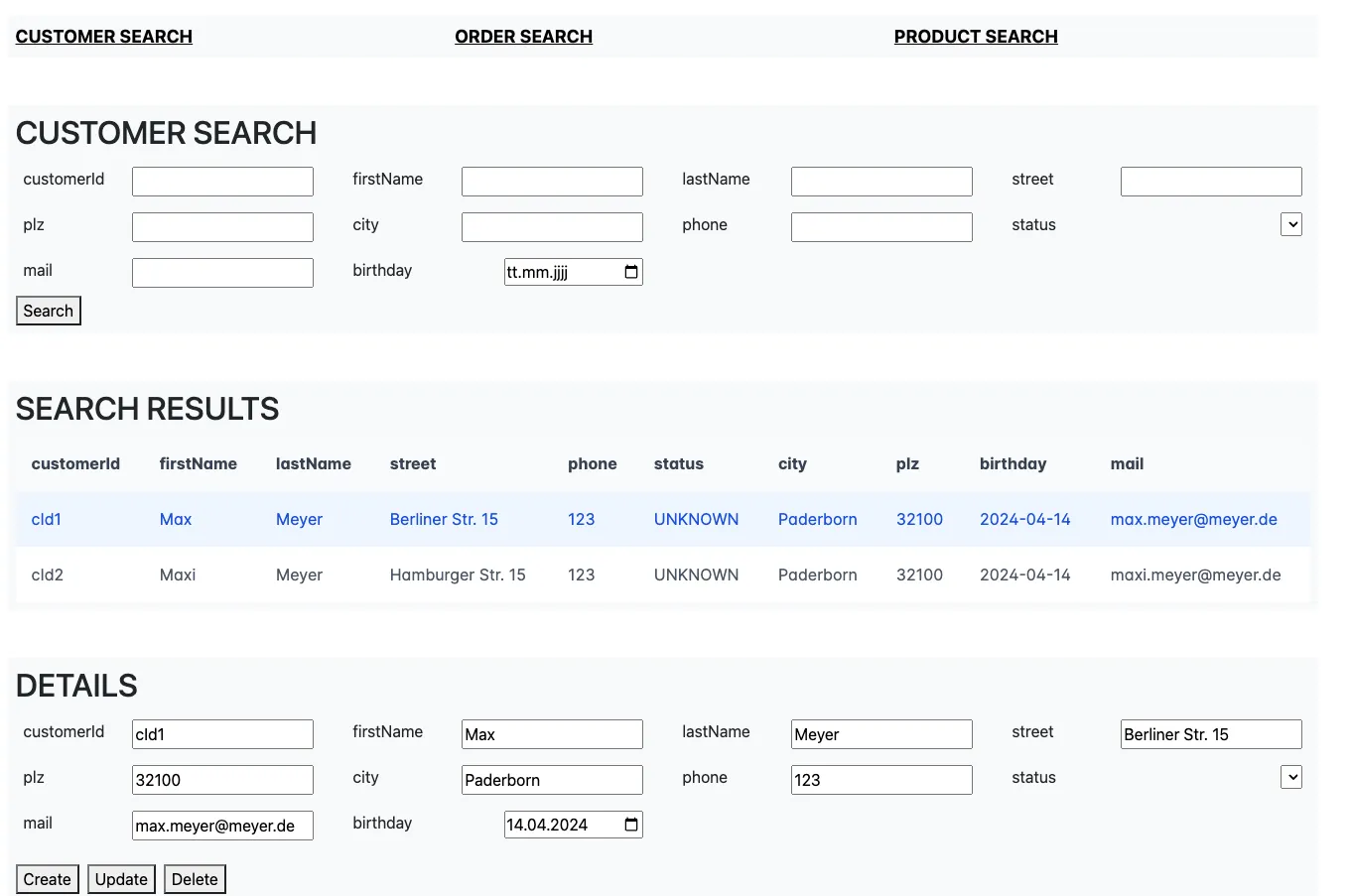
The screen form below is generated from this configuration file.
{
  "model": "customer",
  "apiEndpoint": "api/customers/",
  "permissions": "CRUD",
  "identifier": "customerId",
  "attributes": [
    { "name": "customerId", "type": "String" },
    { "name": "firstName", "type": "String" },
    { "name": "lastName", "type": "String" },
    { "name": "street", "type": "String" },
    { "name": "plz", "type": "number" },
    { "name": "city", "type": "String" },
    { "name": "phone", "type": "number" },
    { "name": "status", "type": "enum" },
    { "name": "mail", "type": "String" },
    { "name": "birthday", "type": "date", "isReadOnly": true }
  ]
}